Argos
A quiet agent that watches the settings that decide how easy your Windows computer is to break into.
- Windows Update
- Windows support
- Antivirus
- Firewall
- Backup
- Screen lock
- Remote access (RDP)
- Guest account
- Admin accounts
- Disk space
- BitLocker
- Password age
What Argos is
Argos is a Windows service that runs in the background and continuously checks the basic security state of the computer: whether protection is switched on, whether doors are left open, and whether maintenance is being kept up.
The check itself is not the point. The point is that the result is translated into plain language, prioritised by severity and followed by a concrete next step. If you can fix it yourself, a button opens the right place in Windows. Otherwise the steps are in Argos, so you or whoever helps you with IT can do it.
Argos is not an antivirus. It does not replace Windows Defender; it watches whether Defender and the rest of your protection are actually switched on.
What Argos looks like
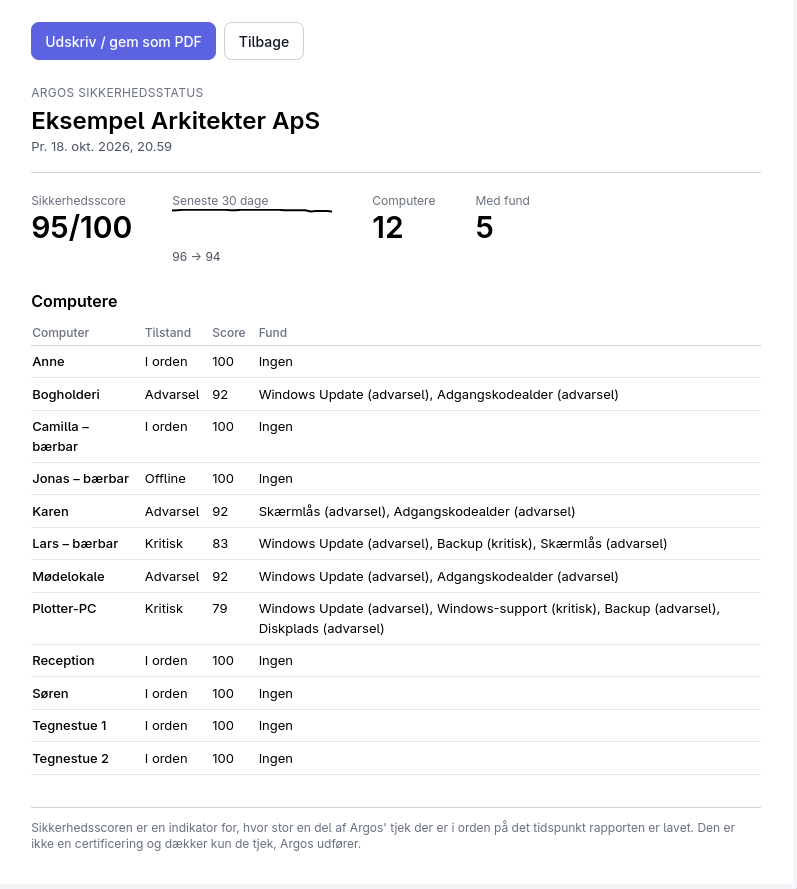
Screenshots from Argos with example data: an imaginary architects’ office with 12 computers. Argos is in Danish, so the screenshots are too.
One glance and you know where you stand
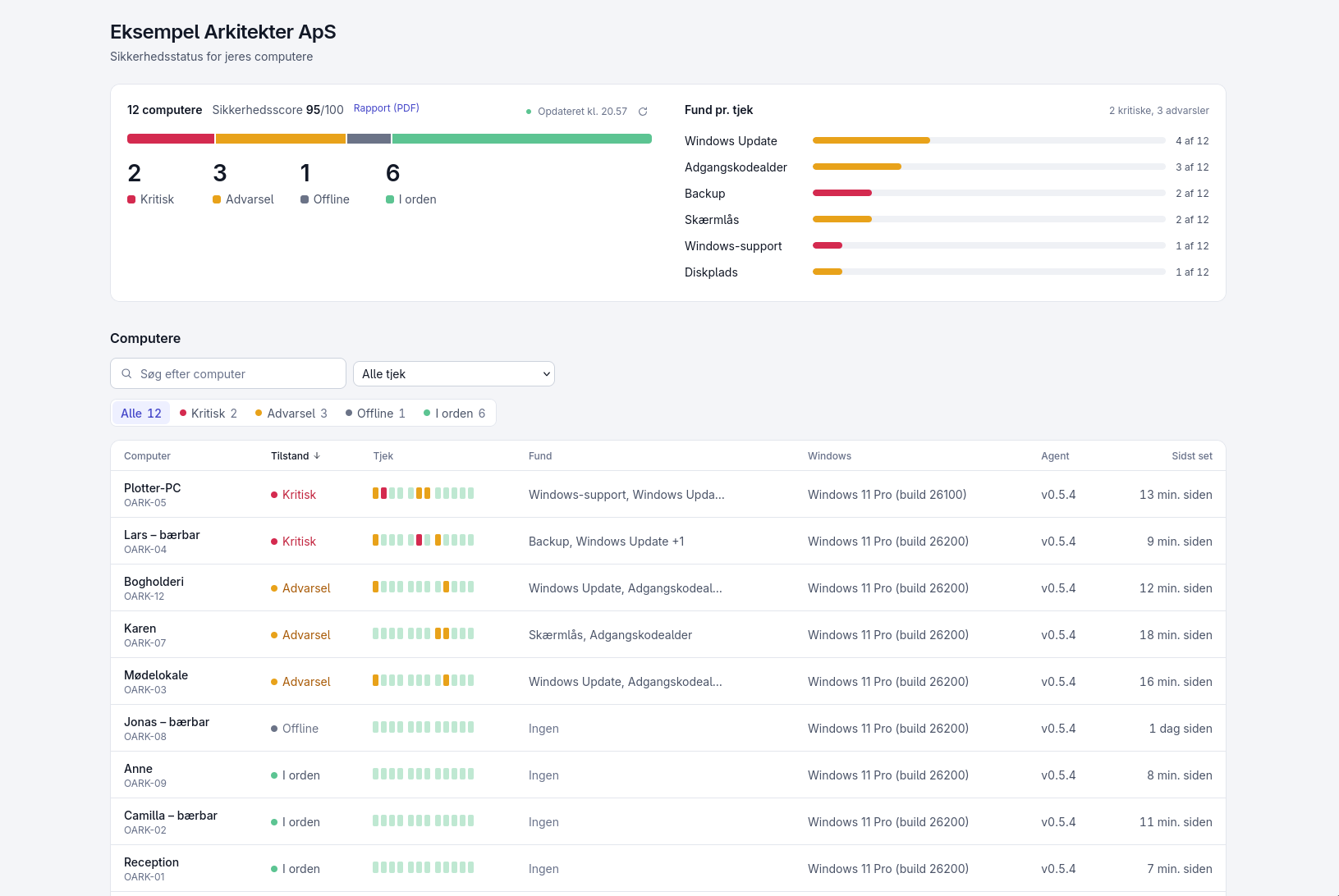
The overview brings all your computers together: how many are fine, how many should be looked at, and which need action now. On the right you see which checks have findings, and the list below shows every computer with its findings.
The app on each computer
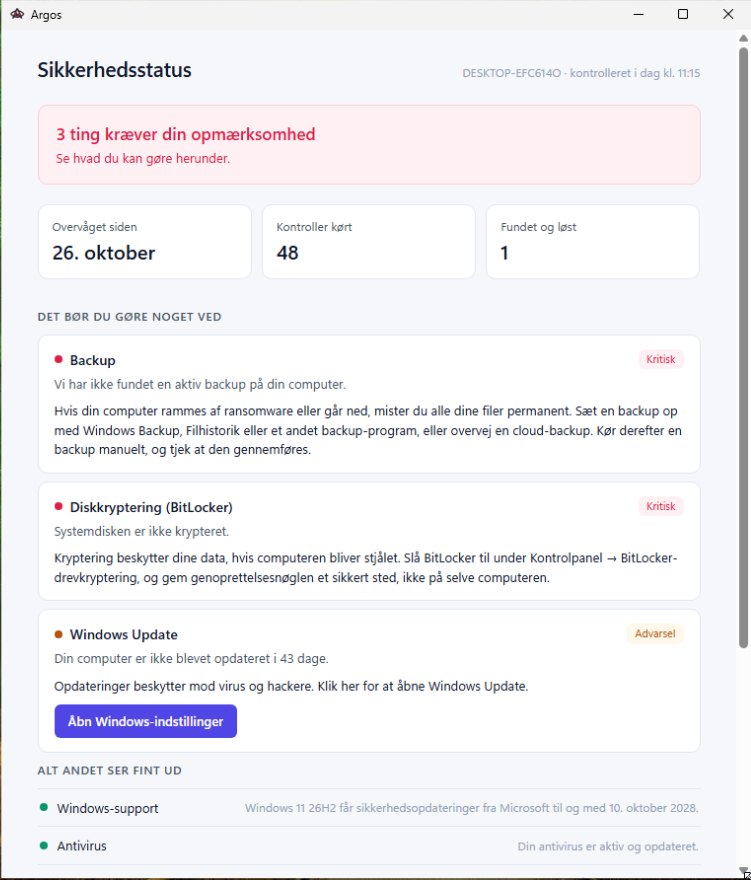
Every computer has its own Argos window. The person at the computer can see for themselves what is wrong and what to do about it, and for some findings there is a button that opens the right setting in Windows.
What is wrong on each computer
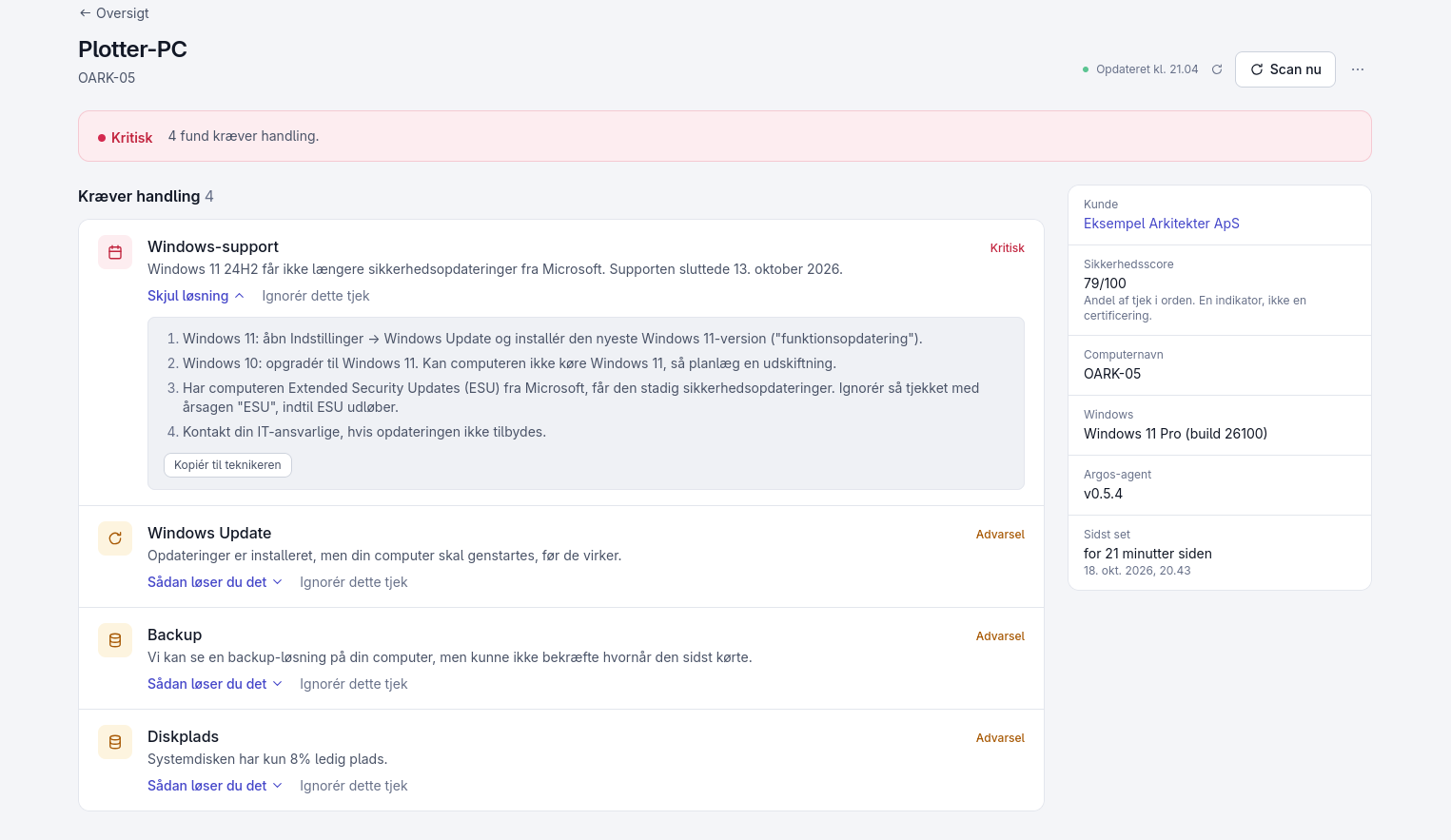
Click a computer and you see every finding explained in one sentence, sorted by severity. Under "How to fix it" are the steps, and "Copy for the technician" passes them on to whoever helps you with IT.
How things change over time
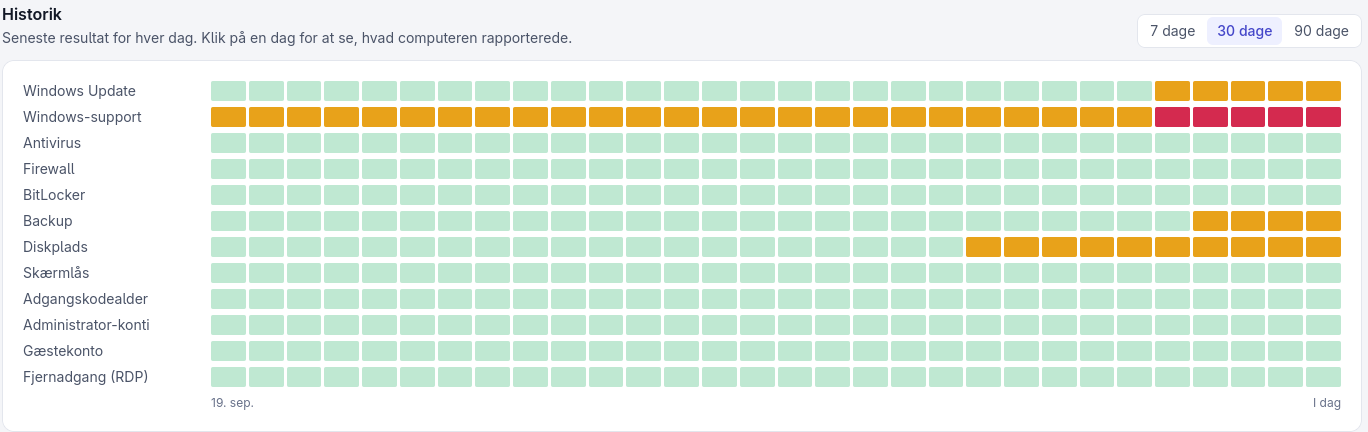
The history shows every check day by day, so you can see when something went wrong and whether it gets fixed.
A report you can pass on
The report puts the status of every computer on one page that you can save as a PDF, for example when your insurer, your bank or a customer asks about your IT security.
What Argos checks
Twelve checks covering the most exploited weaknesses on an ordinary Windows computer. These are the thresholds Argos measures against.
| Check | OK | Warning | Critical |
|---|---|---|---|
| Windows Update | 30 days or less | 31-60 days, or restart pending | Over 60 days |
| Windows support | Over 90 days left | 90 days or fewer left | No longer gets security updates |
| Antivirus | Active and updated | Active but not updated | Disabled or not found |
| Firewall | All profiles active | Only the domain profile disabled | Private or public profile disabled |
| Backup | 7 days or less | 8-30 days, or time unknown | Not found or over 30 days |
| Screen lock | 15 min or less | 16-30 min | Not configured or over 30 min |
| Remote access (RDP) | Disabled | — | Enabled |
| Guest account | Disabled | — | Active |
| Admin accounts | No new accounts | First run: accounts noted | New accounts found |
| Disk space | Over 10% free | 6-10% free | 5% free or less |
| BitLocker | Enabled | Not available | Disabled |
| Password age | 90 days at most | Over 90 days | — |
The checks explained
For each check: what Argos looks at, why it matters, what the result means, and what you do.
Windows Update
- What is checked?
- How many days have passed since the computer last installed a Windows update, and whether it is waiting for a restart to finish the updates.
- Why does it matter?
- Most attacks use holes Microsoft has already closed. A computer that is not updated leaves known holes open.
- What does the result mean?
- OK: 30 days or less
- Warning: 31-60 days, or restart pending
- Critical: Over 60 days
- What do I do?
- The button opens Windows Update. Check for updates, install them, and restart if Windows asks you to.
Windows support
- What is checked?
- Whether your Windows version still gets security updates from Microsoft. Argos looks at both the version (e.g. Windows 11 24H2) and the edition (e.g. Home or Pro), because the support period depends on both.
- Why does it matter?
- A computer can be fully updated and still run a version Microsoft has stopped fixing. New holes then never get closed, even with antivirus and firewall switched on.
- What does the result mean?
- OK: Over 90 days left
- Warning: 90 days or fewer left
- Critical: No longer gets security updates
- What do I do?
- The button opens Windows Update, where you install the latest Windows 11 version. If the computer runs Windows 10 and cannot run Windows 11, it will need replacing in time. If you have bought Extended Security Updates (ESU), Argos cannot see that; you can then ignore the check with the reason ESU.
Antivirus
- What is checked?
- Whether an antivirus program is registered in Windows, whether it is switched on, and whether it knows the latest threats. This covers Microsoft Defender and other programs that register with Windows.
- Why does it matter?
- Antivirus stops much of the malicious software that would otherwise run. It only helps when it is on and up to date.
- What does the result mean?
- OK: Active and updated
- Warning: Active but not updated
- Critical: Disabled or not found
- What do I do?
- The button opens Windows Security, where you switch protection back on or update it. If you use a program other than Defender, open that instead.
Firewall
- What is checked?
- Whether Windows Firewall is on for the three network profiles: private, public and domain. If you use another firewall that registers with Windows, it counts too.
- Why does it matter?
- The firewall rejects incoming connections the computer did not ask for. If it is off on a public network, such as a café, others on the network can reach the computer directly.
- What does the result mean?
- OK: All profiles active
- Warning: Only the domain profile disabled
- Critical: Private or public profile disabled
- What do I do?
- The button opens Windows Security, where you switch the firewall back on for all profiles.
Backup
- What is checked?
- Whether there is a backup, and when it last ran. Argos can read the time from Windows’ own backup. If you use another backup program, Argos can see that it is running, but not always when it last made a backup; the check then shows a warning.
- Why does it matter?
- If the computer is hit by ransomware, a crash or theft, a backup is the only thing that gives you your files back.
- What does the result mean?
- OK: 7 days or less
- Warning: 8-30 days, or time unknown
- Critical: Not found or over 30 days
- What do I do?
- Make sure a backup is running, e.g. Windows Backup, File History or another backup program. Run a backup manually and check that it finishes. If you have no backup at all, consider a cloud backup.
Screen lock
- What is checked?
- How long the computer waits before it locks and requires a sign-in when nobody is using it.
- Why does it matter?
- An unlocked computer left out during lunch can be used by anyone walking past, with access to your email, files and programs.
- What does the result mean?
- OK: 15 min or less
- Warning: 16-30 min
- Critical: Not configured or over 30 min
- What do I do?
- The button opens Windows Settings, where you make the computer require sign-in and shorten the wait.
Remote access (RDP)
- What is checked?
- Whether Remote Desktop is switched on, so others can sign in to the computer over the network. Argos sees whether it is on, not whether it can be reached from the internet.
- Why does it matter?
- Remote Desktop is one of the most common ways in for attackers, especially when it can be reached from outside.
- What does the result mean?
- OK: Disabled
- Critical: Enabled
- What do I do?
- If you do not use Remote Desktop, switch it off under Settings → System → Remote Desktop. If you use it on purpose, for example for remote help, limit it to the accounts that need it and ignore the check with a reason.
Guest account
- What is checked?
- Whether the built-in Windows guest account is switched on.
- Why does it matter?
- The guest account can be used without a password. It is off by default, so if it is active, someone has switched it on.
- What does the result mean?
- OK: Disabled
- Critical: Active
- What do I do?
- Switch the account off under Computer Management → Local Users and Groups → Users: right-click Guest, choose Properties, and tick "Account is disabled".
Admin accounts
- What is checked?
- Whether new accounts with administrator rights have appeared. The first time Argos runs, it notes the existing accounts, and then tells you if new ones appear.
- Why does it matter?
- A new administrator account that nobody created on purpose can be a sign that someone has got in and wants to make sure they can come back.
- What does the result mean?
- OK: No new accounts
- Warning: First run: accounts noted
- Critical: New accounts found
- What do I do?
- Find out whether someone created the account on purpose. If not, remove it straight away, change the passwords on the computer, and talk to whoever helps you with IT.
Disk space
- What is checked?
- How much space is left on the system disk, usually C:.
- Why does it matter?
- When the disk is full, Windows cannot install updates, and programs and backups can stop working.
- What does the result mean?
- OK: Over 10% free
- Warning: 6-10% free
- Critical: 5% free or less
- What do I do?
- The button opens Storage in Windows Settings, where you clean up temporary files and remove programs you do not use.
BitLocker
- What is checked?
- Whether the system disk is encrypted with BitLocker. BitLocker does not exist on Windows Home; there the check shows as not applicable.
- Why does it matter?
- If a laptop is stolen or left on a train, everything on an unencrypted disk can be read by whoever has it. With encryption, the data cannot be read without signing in.
- What does the result mean?
- OK: Enabled
- Warning: Not available
- Critical: Disabled
- What do I do?
- Switch BitLocker on under Control Panel → BitLocker Drive Encryption. Store the recovery key somewhere safe, not on the computer itself; without it you can lose access to your data.
Password age
- What is checked?
- Whether any active local user account on the computer has a password that has not been changed in over 90 days. Argos includes the account’s name, so you know which one it is.
- Why does it matter?
- An old password has had a long time to be leaked or guessed, especially if it is also used elsewhere.
- What does the result mean?
- OK: 90 days at most
- Warning: Over 90 days
- What do I do?
- The button opens the sign-in settings, where you change the password. Choose a long password you do not use anywhere else.
- If Argos cannot complete a check, it shows as unknown, never as green.
- Green means what Argos checks is in order. It is not a guarantee that the computer is secure in every situation.
How it works
Installs like an ordinary program
You download the installer, enter the activation code we give you, and Argos is running. No configuration and no IT knowledge required.
Runs quietly in the background
The agent checks the computer every hour and uses no noticeable resources. You will not feel it day to day.
Speaks up when something needs you
Green means calm. When something needs fixing, the Argos icon by the clock changes colour, and Argos explains in plain language what is wrong and what to do.
Status: close to launch
Argos is ready for its first pilot customers. We are looking for a few who will use it day to day for 2-3 months and help shape it. The pilot is free, and you get direct contact with the person who builds Argos.